
The Duration Picker component allows a user to select a duration from a drop-down list. This sets the a datetime variable linked to Start Date/Time, as well as a text variable linked to Duration. This article describes the duration picker, and applies to versions 4.4 and later of IFS OI Explorer.
Read more
The Date/Time Range Picker component allows a user to select two date/times, or a duration (such as 1 month) with an end date/time or "Now".
These date/times are preconfigured to set the page defaults variables for startTime and endTime, which in turn can be used for retrieving data such as trends or charts. This article describes how to configure a Date/Time Range Picker in versions 4.4 and later of IFS OI Explorer.
This article applies to versions 4.4 and later of IFS OI Explorer.
Read more
The Date Picker component allows a user to select a date. This will either set a startDate and endDate variable (as a 24-hour time range), or set a startDate (at the selected date), or set an endDate variable (at 24 hours after the selected date) - all depending on how you configure the component.
Read more about the Date Picker control: this help applies to versions 4.4 and later of IFS OI Explorer.
Read more
The Date/Time Picker component allows a user to select a date and time, which updates its Date Time property. If configured to use a variable, the date/time picker can update data on the page, using the selected date and time. This help applies to version 4.4 and later of IFS OI Explorer.
Read more
The Selection List can be configured to allow a user to select a single item, or multiple items from a defined list. The selection is usually used by some other component or dataset query in the page.
Read more
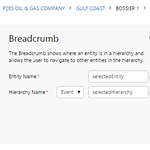
Breadcrumbs allow users to easily traverse a hierarchy to find an entity. This article describes how to configure breadcrumbs in versions 4.4 and later of IFS OI Explorer.
Read more

A Combo Box displays values in a drop-down list. It is often used to enable the user to select a value to pass to other components on the page. This article describes how to configure a combo box in versions 4.17 and later of IFS OI Explorer.
Read more
The Level Meter is used for displaying level measurements against configurable limits. Its appearance changes when limits/alarm thresholds are exceeded. This article applies to Version 4.4.2 and later of IFS OI Explorer.
Read more

The Pivot Table component displays data in sections that are grouped and summed; if the pivot table is configurable, users can manipulate which columns, rows, and values to display.
This tutorial guides you through how to add and configure a Pivot Table on an Explorer page in versions 4.4 and later of IFS OI Explorer.
Read more
The Entity Selector allows a user to select one or more entities from a list. The user can either use a search bar to search for entities by name, or use a filter to find the entities in a hierarchy. This article describes how to configure an Entity Selector, and applies to versions 4.4.0-4.5.3 of P2 Explorer.
Read more