Most reports don't need every row. They need counts, totals, latest dates and averages. OI OData can do that work on the server with $apply, so a dataset returns a handful of summary rows instead of thousands of raw ones. This article applies to version 26R2 and later of IFS…
Read more
Parameters let page users choose the values a dataset filters on, such as a date range, an asset or a workspace. OI OData datasets use their own set of keywords, which write each value in the correct OData format. This article applies to version 26R2 and later of IFS OI…
Read more
This page covers the everyday OData query options: choosing columns, filtering, sorting and limiting rows. It also explains how values are written and how the results become dataset columns. This article applies to version 26R2 and later of IFS OI Explorer. Anatomy of a dataset query Start with the object…
Read more
This guide explains how to configure the OI OData Adaptor, create a dataset query, add parameters, and display the results on an Explorer page. This article applies to version 26R2 and later of IFS OI Explorer. Before you begin, make sure you have: Access to IFS OI Core Management, with…
Read more
This primer explains what OData is, how the OI OData Adaptor turns an OData query into a dataset, and how Explorer's objects map to the equipment and records in your operation. This article applies to version 26R2 and later of IFS OI Explorer. What is OData? OData (Open Data Protocol)…
Read more
OI OData lets you query Explorer's own data the same way you query any other datasource. Asset models, tags, entries, log sheets, Sentinel events, workbooks and usage analytics are all available through a single, standard query language. Use the results on Explorer pages, or pull them straight into Excel, Power…
Read more
The Generic REST adaptors connect IFS OI Server to REST web services that return JSON, without custom code. You describe how to call the service and where the data sits in its response, and the adaptor turns that response into time series or dataset data. Related: Dataset Datasources, Tag Datasources…
Read more
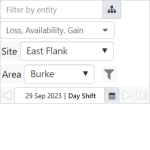
The Filter Bar filters the events shown in the entries table and the timeline, enabling you to filter the events by entity, event type, site and area, and by applying a customised time period.
Read more

This article applies to Case Management in versions 4.9.3 and later of IFS OI Explorer. Case Management is all about activities and changing statuses surrounding events for cases that have been manually raised in Explorer or Shift Log, and those raised in source applications such as IFS OI Sentinel. A…
Read more

IFS OI Explorer allows you to link to a saved trend via a URL. There are 2 ways of doing this: Sharing the link through the IFS OI Explorer framework, or manually entering the URL. This article examines both methods, and also shows you how to remove the Explorer frame from the trend.
Read more